
Friday, July 18, 2008
New Header
I had an artistic moment this afternoon so I made a new header for the blog. These moments don't come often so I took advantage of it while it was there. Enjoy.

Thursday, July 17, 2008
Updates!! (Finally)
This has been in beta testing for a couple of weeks but I finally had enough time today to get it finished...
For a while now, I've been wanting to clean up the camera files. So, I have taken the previously named "ks1", "ks2" and "ks3" files and converted them to just one placefile and one bat file. While this does make each respective file longer, it also allows the user to have just one placefile loaded for the Kansas cameras instead of 3. I don't know about you but my placefile manager is almost full!!
I also have changed the "gr3cambat.txt" file too.
Any questions, comments or concerns...please let me know!
Rodney
For a while now, I've been wanting to clean up the camera files. So, I have taken the previously named "ks1", "ks2" and "ks3" files and converted them to just one placefile and one bat file. While this does make each respective file longer, it also allows the user to have just one placefile loaded for the Kansas cameras instead of 3. I don't know about you but my placefile manager is almost full!!
I also have changed the "gr3cambat.txt" file too.
Any questions, comments or concerns...please let me know!
Rodney
Wednesday, June 18, 2008
Sorry for Lack of updates lately
Needless to say with the severe weather season ongoing, I've had no time for side projects, including updates for the web cameras and such. Hopefully the death ridge will build in soon and things will calm down and dry out. Once that happens, I can resume some other projects.
Thursday, March 27, 2008
Crude Profiler and Upper air data displayed on GRLevel3
A few days ago I was thinking, "I'd like to see profiler data on GRLevel3". I've been working on this little project since then and I finally have it the way I like.
It works very similar to the web camera scripts that I've maintained for the last year and a half. The scripts run locally on your computer using the programs URL2File and ImageMagick. (If you are new to the web cameras, see my initial "how-to" post.)
Using URL2File, I downloaded profiler data (.gif files) available on the NCAR/RAP Real-Time Weather Data page. After I saved an initial picture, I used the ImageMagick scripting to resize it and combined it with a transparent triangle (pointer.png). I then wrote a placefile script for each profiler site, so the operator could toggle it on/off. There's just too much overlap/screen blockage if you try to display them all in one placefile (trust me, I tried it already!) The final result looks like this:
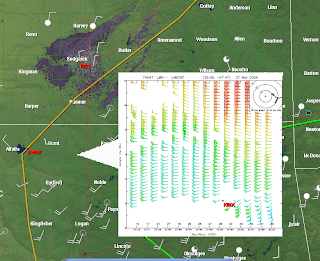
It's by no means perfect but if you want a quick and dirty method to display the data, then you're in luck.
Here's how I set everything up:
On my computer, I have the following directory set up:
C:\Program Files\GRLevelX\GRLevel3\pictures\profiler
The "pictures" folder is where all of the webcam pics go. To organize things, I created a "profiler" folder. This is where I put the "profilerUCAR.bat", "pointer.png" and "sitedown.jpg", the latter of which is used by the scripts in case the site is down (to keep the .bat file from freezing up). Remember: before you can operate the script, you must change the name from "profilerUCARbat.txt" to "profilerUCAR.bat" (without the quotation marks of course).
Here's how the first block of the script looks:
URL2File http://www.rap.ucar.edu/weather/upper/lmn_wp.gif lmn.jpg ||convert sitedown.png lmn.jpg
convert lmn.jpg -resize 400x400! lmntemp.png
convert pointer.png lmntemp.png +append lmn.png
The rest of the script can be found on the "Profiler/Upper Air Project" on the right part of my blog. The placefile for the Lamont, OK site looks like this:
; Crude Profiler data for GRLevel3
; by Rodney Price 3/26/08
Refresh: 10
Title: Lamont, OK Wind Profiler
Threshold: 250
IconFile: 1, 1000, 400, 500, 200,"C:\Program Files\GRLevelX\GRLevel3\pictures\profiler\lmn.png"
Font: 1, 11, 1, "Arial"
Icon: 36.68, -97.47, 0,1,1, "Lamont, OK Wind Profiler\nHourly data"
Right now, I have worked on just 6 sites for my local area but it will serve as a template so that you can easily add sites for your area if you wish.
In addition, I changed up the code a bit to also display the UCAR upper air data. It operates pretty much the same as the profiler scripts. I created another folder in the "pictures" directory for "upperair" (to keep it separate from the profiler stuff). Put the file "raobsbat.txt" in that folder (and change the name to "raobs.bat"). In addition, a copy of the "pointer.png" and "sitedown.png" file each must be in this folder too so the .bat file will work properly.
The TOP and DDC sites can also serve as a template if you wish to add more sites.
I hope all of this made sense. Please let me know if you have any questions or problems!
Rodney
It works very similar to the web camera scripts that I've maintained for the last year and a half. The scripts run locally on your computer using the programs URL2File and ImageMagick. (If you are new to the web cameras, see my initial "how-to" post.)
Using URL2File, I downloaded profiler data (.gif files) available on the NCAR/RAP Real-Time Weather Data page. After I saved an initial picture, I used the ImageMagick scripting to resize it and combined it with a transparent triangle (pointer.png). I then wrote a placefile script for each profiler site, so the operator could toggle it on/off. There's just too much overlap/screen blockage if you try to display them all in one placefile (trust me, I tried it already!) The final result looks like this:

It's by no means perfect but if you want a quick and dirty method to display the data, then you're in luck.
Here's how I set everything up:
On my computer, I have the following directory set up:
C:\Program Files\GRLevelX\GRLevel3\pictures\profiler
The "pictures" folder is where all of the webcam pics go. To organize things, I created a "profiler" folder. This is where I put the "profilerUCAR.bat", "pointer.png" and "sitedown.jpg", the latter of which is used by the scripts in case the site is down (to keep the .bat file from freezing up). Remember: before you can operate the script, you must change the name from "profilerUCARbat.txt" to "profilerUCAR.bat" (without the quotation marks of course).
Here's how the first block of the script looks:
URL2File http://www.rap.ucar.edu/weather/upper/lmn_wp.gif lmn.jpg ||convert sitedown.png lmn.jpg
convert lmn.jpg -resize 400x400! lmntemp.png
convert pointer.png lmntemp.png +append lmn.png
The rest of the script can be found on the "Profiler/Upper Air Project" on the right part of my blog. The placefile for the Lamont, OK site looks like this:
; Crude Profiler data for GRLevel3
; by Rodney Price 3/26/08
Refresh: 10
Title: Lamont, OK Wind Profiler
Threshold: 250
IconFile: 1, 1000, 400, 500, 200,"C:\Program Files\GRLevelX\GRLevel3\pictures\profiler\lmn.png"
Font: 1, 11, 1, "Arial"
Icon: 36.68, -97.47, 0,1,1, "Lamont, OK Wind Profiler\nHourly data"
Right now, I have worked on just 6 sites for my local area but it will serve as a template so that you can easily add sites for your area if you wish.
In addition, I changed up the code a bit to also display the UCAR upper air data. It operates pretty much the same as the profiler scripts. I created another folder in the "pictures" directory for "upperair" (to keep it separate from the profiler stuff). Put the file "raobsbat.txt" in that folder (and change the name to "raobs.bat"). In addition, a copy of the "pointer.png" and "sitedown.png" file each must be in this folder too so the .bat file will work properly.
The TOP and DDC sites can also serve as a template if you wish to add more sites.
I hope all of this made sense. Please let me know if you have any questions or problems!
Rodney
Saturday, February 23, 2008
Whoops...it's been while
Good evening!
I've been a little busy with projects for the upcoming Spring severe weather season so sorry for the shortage of updates here. I'll try to get a few more updates next week. I've found a few more cameras to add to the mix.
I've been a little busy with projects for the upcoming Spring severe weather season so sorry for the shortage of updates here. I'll try to get a few more updates next week. I've found a few more cameras to add to the mix.
Subscribe to:
Posts (Atom)